ROLE
Staff Product Designer
PROJECT SPAN
2025–2026
TEAM
1 product manager, 2 ML engineers, 1 UI engineer
SCOPE
The human review layer for schedule tagging inside the Construction Analysis Portal: correction workflow, review interface, training-data loop. Hexagon’s AI Hub built the initial model. Our ML engineers trained, developed and implemented it from there.
STATUS
The beta shipped and ran on customer projects; the in-platform review table was prototype-tested with the Customer Service team and shipped.
IMPACT
Designed the Customer Service team’s move from hand-tagging every code to correcting only the ones the model got wrong.
WBS codes are the taxonomy that identifies construction materials and tasks, and connects the schedule, the BIM (the 3D blueprint), and our reporting. Every general contractor formats schedules differently, and none of it is standardized, sometimes not even inside one organization. When tagging codes to the schedule, someone had to read each line item and decide what it was.
I was on a team spun off to reduce the org’s operating costs, so the PM and I went through the Customer Service timesheets. Tagging and schedule updates were among the biggest line items: about 20 hours per project in ideal conditions, across up to four people, off the Customer Service timesheet ledger. The ask that came out of the planning documents was a 25 percent reduction in six months, and the timesheets that would show it were still coming in.
TWO REASONS THIS NEEDED MACHINE LEARNING
The rest were added, renamed, removed, or split between versions. Tags couldn’t carry forward. Each revision started over from scratch.
unique activities across the baseline and six revisions
(20%) present in all seven
(21%) appeared in only one
RENAMED · Floor Trusses - 3rd Floor

Baseline / Feb 21, 2022

Revision 3 / Sep 13, 2022
Naming changed from customer to customer, project to project, even revision to revision.

CUSTOMER A · Names read Sprinkler Head Ceiling Drops - FSA - 2nd Floor - CL 1‑5/C‑A · area codes, grid lines, dashes

CUSTOMER B · Names read Pour Concrete - Pour 1 - Floor 1 · pour and floor, no grid
Helping our Customer Service team QA algorithmic predictions was a problem we’d solved a few times. Auto clash just did it for you: it found where something built off the BIM ran into something that wasn’t built yet. It ran ahead of their QA pass, and they were already going through every single clash and deviation (anything built out of place) one by one, so the effort stayed the same. For auto clash we created ways to help them find their way through that heap of QA work. Auto grouping bundled single elements into named systems like fire suppression, and we couldn’t let it group things on its own. Groups are harder to detect, and inspecting every single element was never part of QA the way clashes and deviations were, so nothing got grouped until someone approved it. This dataset was bigger than both. They really couldn’t review each thing, and approving every suggestion one at a time wasn’t going to work either.
Three workflow questions overlapped across many of these: what did it decide, how do I know it’s right, and how do I fix it if it’s wrong.
“Certainty % would be really helpful so we could just focus on the things in need.”
— Auto clash and impeded elements, Jan 2023
“I am looking for things the algorithm didn’t catch.”
— QA Discovery, Oct 2022
“If I am wondering how the algorithm decided something, someone likely didn’t do a good job with QAQC.”
— QA Discovery, Oct 2022
Quoted from my live session notes at the time. Dates are the documents’ own authoring dates; spelling and punctuation regularized, wording unchanged.
I pulled four requirements out of all of it. Show what the system claimed, show how sure it was on each option, make it checkable by eye, and make the override one click.
Leadership wanted AI features out and the model in real use quickly. The model needed a path that captured corrections, and the Customer Service team needed the old way left alone. We had a few strong back-end engineers on the team and only one comfortable with the front end. The complete in-platform version was a bit more scope than we could handle quickly.
The alternative was a partial in-platform build, and it was worse. Any stripped-down version of the table would leave them still needing to do some work in Excel, and splitting it across platforms was asking for trouble.
I had doubts on how stripped down the beta was and agreed to it anyway. The users were our own team and the engineering lift was small. I kept designing the full table in parallel so it’d be ready when the budget was.
That meant the model shipped without the interface. A beta panel was added to the existing spreadsheet workflow: upload a TSV, download suggested codes, correct them, upload the corrected file, then upload the full schedule as before. Reviewing the codes took the same work it always had, and the single upload became three uploads and a download. The bet was that we’d be cutting away at the Excel work over time, but certainly not immediately. Corrected files were stored to use as training data for the model.
It didn’t take enough judgment off them to justify the logistics it added. They still reviewed every code, and now they had to also work out which upload field to use. The algorithm was right some of the time at first.

BEFORE
Every schedule update resets the entire process. Most projects update multiple times.
The manual process: the customer sends a schedule, the Customer Service team codes it in Excel, uploads it, and the next schedule update resets the whole thing.

PHASE 1 BETA
The model was in the loop. Getting the work in was next.
The same journey with the model in it, and one upload became three uploads and a download.

WHAT ACTUALLY SHIPPED
The beta in production. Three new buttons above the two that were already there: upload an unprocessed TSV, download the suggestions, correct them in Excel, re‑upload.

ACCEPTANCE CRITERIA
Our lead engineer and I wrote the acceptance criteria the beta was built against. Seven Gherkin scenarios from June 2025.

THE ERROR CASES
Engineering gave me the reasons an upload could fail so I could write copy.

NOT USED
Some design iteration for an attempt to simplify the upload fields.
Adoption among the Customer Service team was low. On the surface, the beta added steps to a process that already frustrated them. Volunteering corrections to a model was a hard sell when many on the team were wary of giving data to something that could make them less needed. The payoff stayed invisible: people corrected output, submitted data, and nothing on screen showed what it was building toward. What usage it got came from a few team members who agreed to trial it on some of their projects.
Engineering shared daily updates in standup, and at first the training data trickled in slowly. As the team updated the model, they shared progress in an all-hands every other month, alongside the other ML work.

BEFORE AND AFTER
What I used to walk Customer Service leadership through the changes. Their team’s review still ran through a spreadsheet.

MARGIN NOTES
My margin notes beside the beta panel. The panel’s copy is an earlier draft of what shipped.
The schedule changed, and the Customer Service team tagged the whole thing again from scratch as fast as they could. In the version I designed, you upload the new schedule and the previous tags persist onto it, so a row that moved keeps the code someone already corrected, and the work narrows to what’s new or heavily changed. The engineering team worked out how to make it actually happen, which was the harder problem.
One wrong code had layers of damage under it. Analysis built on analysis, so a single bad match cascaded wrong data into surfaces all over the product. The hard part was finding a review cadence that fit both the model we had at rollout and the one we expected to have later. The open question was what review should cost.
Most tools that show a person a model’s guess want an accept on every item. Grammarly asks per suggestion. One accounting tool pre-fills the category, shows a confidence badge, and still needs an approval on every row, and its users trade tips on how to approve a whole group at once. Invoice-processing tools handle the same problem differently: a confidence threshold decides whether a person looks at all, and the person only fixes what’s wrong. An approve step needs a reject step beside it, and an approve click on a thousand rows is just moving the old work to a new flow. The table pre-fills every line with the model’s best guess, and the only action is correction, as needed. A correct guess needs nothing from the user at all, and making that the default is the decision I think saves the most time against this work. Approving and rejecting are implied by whether a row gets corrected: one less decision on every line. Engineering shipped the table in my last week, so whether it moved adoption was never measured. The prototype test is in the next section.
A single save persists the schedule, sends every correction to the ML server as labeled training data, and says so on screen. From there the ML team anonymizes it, retrains in a controlled setting, and ships model updates.

PHASE 2
My diagram of the training loop.

IN THE PRODUCT
The review table pre-filled with model suggestions, each carrying its confidence badge, and the save confirmation naming what was sent back for training.
Above a threshold, suggestions aren’t surfaced for review, so they’re accepted by default. Below it, rows are flagged and a filter collapses the table to only what needs human eyes. The threshold is adjustable, because what’s safe to skip differs from one reviewer to the next and moves as the model improves. Reviewing everything was on the table, and so were fixed thresholds, but neither would work with the changing need. The slider let each reviewer set their own comfort level as the model improved.
Above the threshold, the certainty was judged high enough to spend no one’s attention on those rows. Every value stays a field a person can change.
Transparency: I surfaced the match score the algorithm produced for its own guess, meaning how close a match it found across the factors it weighs. The spread between guesses was wide enough that a label alone would have hidden it.
Inspectability: Every option in the dropdown carries its own match percentage, so a reviewer can see how close the call was.
Visual verification: The code, its plain-English description, and the badge all sit on the row, so a reviewer judges the call without opening anything.
One-click override: A correction is worth more than one row. A customer might split plumbing into line items by wing or floor when all of it maps to one trade, so fixing one code offers to fix the rest.
This interaction was a little too detailed to validate with a Figma prototype, especially the autocomplete search field, so I built it out in HTML with Claude Code and populated it with anonymized sample data from a real project. I tested it with three Customer Service team members in January 2026, each working a schedule as if it were a live project. What I wanted to know was whether the badge and the dropdown made sense to someone who’d never seen a confidence score. All three got through the simulated tagging exercise. Search covers any code the model hadn’t guessed. Type a few characters and the full code library is there under the ranked list.
I built the predictive dropdown to the component standards of Pangaea, Hexagon’s design system, and handed it to the platform team.

SETTING THE THRESHOLD
The threshold popover at 70 percent: 990 activities auto-accepted, 36 flagged for review.
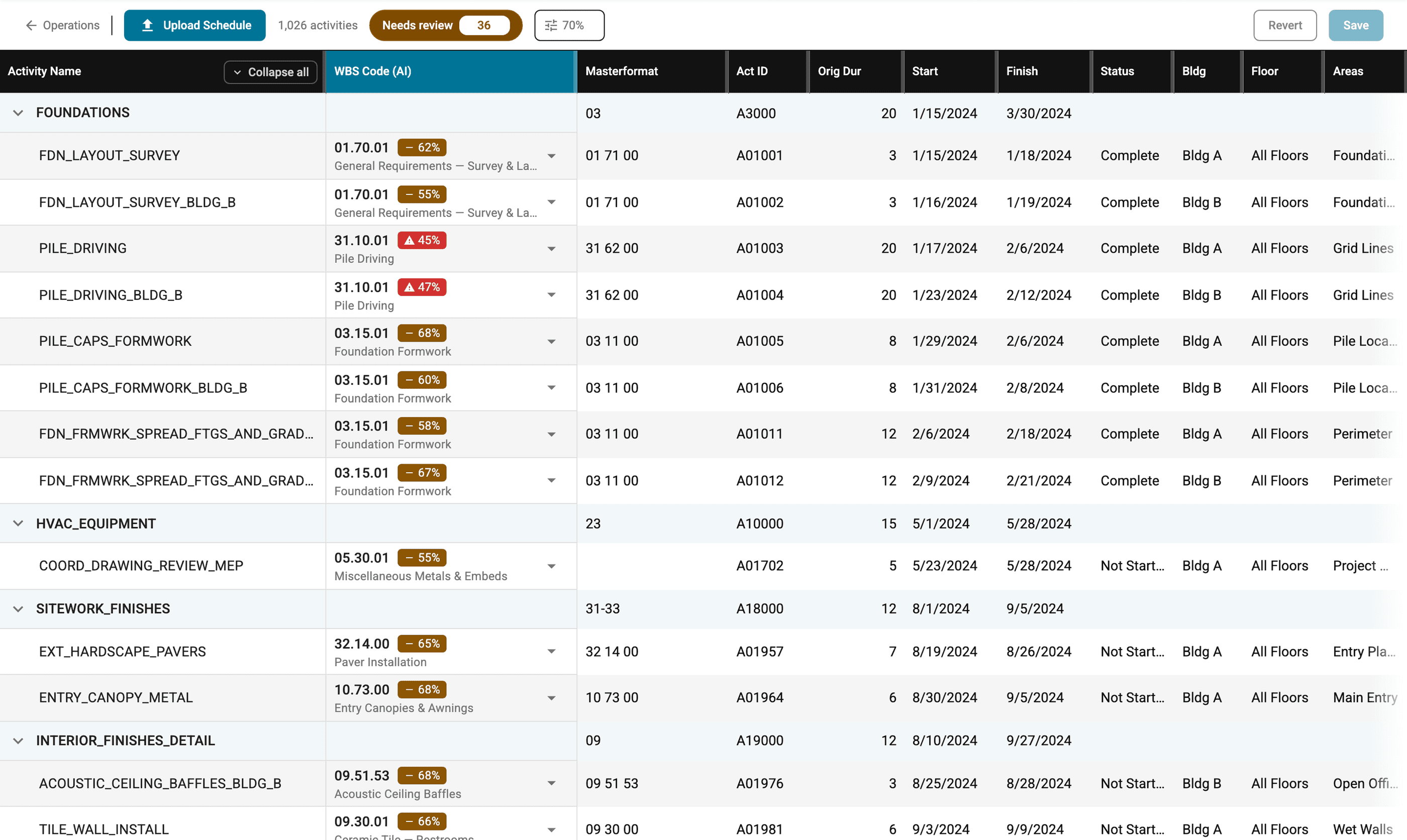
FILTERED TO NEEDS REVIEW
The Needs Review filter collapsing 1,026 activities to 36.
Every suggestion carries a shape-coded badge, so the state reads without relying on color.

CHECK
94% · at or above the default threshold of 70, accepted by default

DASH
62% · 50 to 69, below the threshold, routed to a person

TRIANGLE
45% · below 50, routed to a person
Each shows how a row reads in the review table, at its own score.
Two moments that cannot share a frame: the propagate prompt fires only after a code is picked, and picking closes the dropdown.

RANKED ALTERNATIVES
The dropdown, with AI suggestions ranked by confidence.

APPLY TO SIMILAR
After the pick, the system offers to propagate the code.
There was a gap between what we could build on that timeline as a product squad and what I knew the users needed, so we counted on the users being our own team and willing to try it. Starting over, I think I’d demo the model running in some kind of low-res UI, just to show the Customer Service team what they were contributing to. I’d also want to look at the uploading with engineering again, because the pipeline already knew which files the model had processed and I wonder if one upload field could have worked off that.
This work tagged schedule rows to WBS codes. The BIM is tagged with the same codes, which is what ties it to the schedule. That is another of the major setup processes: an architect updates the file and someone retags the elements by hand. The team had started scoping the same matching model for BIM elements, and I was designing the review loop for it. Existing tags would carry over to the architect’s new file, the way they carry over to a new schedule. That’s where I’d pick back up. I’d also show which keywords each guess matched on, an idea we talked about as a future release and never got around to scoping.